Every streamer knows: the content conveyor must not stop! But how do you package hours of “raw footage” into dynamic Shorts for YouTube, TikTok, or Reels? This guide will help you cut streams without losing quality, turning long recordings into viral highlights. We’ll break down how long cutting takes, what moments to choose, and how to optimize the process so your content gets monetized.
To turn existing footage into a YouTube Short, choose a bright moment that is self-contained. Shorten it to 3 minutes or less, crop vertically (9:16) so the action remains in focus. Check the audio and subtitles, then upload.
YouTube treats any square or vertical video up to 3 minutes long as a Short, so the shape and length of your export determine most of the outcome.
Choosing a moment for Shorts: from clip to stream
The amount of work depends on your source. A 40-second clip you’ve already trimmed only requires reframing and refinement.
A four-hour stream recording requires finding the right moment first, and this search is usually the slowest part of the process. If you already know which moment you want to use, whether it’s gameplay footage or a saved clip from a stream, it simplifies the task.
Cutting tools: YouTube Remix and third-party services
Cutting Shorts from public YouTube videos
If the source is a long video already published on your channel, YouTube offers a quick path. On the video’s watch page in the YouTube app, tap “Remix,” then “Edit into a Short,” and select up to 60 seconds.
YouTube’s help page limits this feature to your own public long uploads. Private videos, unlisted videos, and videos with third-party copyright claims cannot be used, and the finished Short will link back to the original.
Cutting Shorts from long stream recordings: Eklipse AI
With a long recording, editing is the easy part. Finding 30 seconds worthy of publication in a three-hour stream is the real work.
For gaming streams, Eklipse turns long videos into short clips by scanning VODs for in-game signals, microphone volume spikes, and chat activity. You can connect your Twitch, YouTube, Kick, or Facebook account for recordings to automatically upload after each stream, import a public YouTube video by URL, or upload an MP4.
“Eklipse AI is your personal content pipeline. It doesn’t just cut, it finds gold in your hour-long streams. It’s not just a tool, it’s a solution for mass cutting 100+ clips and automatic stream cutting.”
Each method has its limitations: most streams are processed in minutes, though a four-hour VOD can take up to an hour. Treat the results as a preliminary list.
Eklipse’s own help references call AI selection a starting point, and you can adjust the start and end points of each clip in Eklipse Studio before exporting. Creating and exporting clips requires an Eklipse premium plan.
Optimizing for vertical viewing: cropping and subtitles
Cropping a widescreen game to a vertical format discards about two-thirds of the image, so cropping must be intentional. If you already have a clip and need help with vertical editing, Eklipse’s YouTube Shorts editing workflow includes this.
Eklipse Studio offers vertical layout templates, a layout with a webcam and game feed, cropping, text, and automatic subtitles that you can edit. AI Edit accepts a Twitch or Kick clip URL, a clip from your AI Highlights library, or an MP4 upload up to 1GB if the clip is between 15 seconds and 3 minutes long, and reframes it vertically with subtitles.
Free Eklipse AI Reframe tool
For a single clip without an account, the free browser-based Eklipse AI Reframe tool accepts a Twitch clip URL, a direct .mp4 or .webm link, or an MP4, WEBM, or MOV upload, and exports in 9:16, 4:5, or 1:1 formats. It cannot read YouTube links, so download your footage first if it’s there.
Uploading and checking Shorts
From a computer, sign in to YouTube Studio, click “Create,” then “Upload videos,” and select your file. Before publishing, go through this checklist:
Is it trimmed to 3 minutes or less? Yes.
Is it cropped to square or vertical? Yes.
Is the audio and subtitles checked? Yes.
Frequently Asked Questions
Can you make a YouTube Short from a long video?
Yes. Trim a segment to 3 minutes or less, crop it to square or vertical, and upload. If the long video is public on your own channel, YouTube’s “Edit into a Short” option lets you select up to 60 seconds directly in the app, and the Short will link to the original.
Can you make Shorts from a live stream recording?
Yes, if you have the recording as a file or a supported VOD. Trim each highlight to 3 minutes or less and reframe it vertically. YouTube’s help pages for “Edit into a Short” and Studio clips don’t specify if past live streams are supported, so exporting the recording and editing it yourself is a reliable path.
Should you crop videos to 9:16 before uploading?
Yes, if you want it to completely fill the phone screen. YouTube accepts square video as a Short, but only 9:16 fills the vertical player. Crop it yourself to choose what stays in the frame. This is important for cutting for TikTok from Twitch and other platforms.
What is the difference between turning a long video into clips and editing a clip for Shorts?
Turning a long video into clips means finding moments worth publishing. Editing a clip for Shorts begins after selecting a moment and includes vertical cropping, trimming, subtitles, and export. Long recordings require both steps; a clip you’ve already cut only requires the second.
Conclusion
Stream cutting is not just editing, it’s a strategic step to expand your audience and monetize your stream through cuts. You don’t have to be a professional editor to create amazing gaming clips. Let Eklipse AI automatically detect your best moments and turn them into epic highlights!
Limited free clips are available. Don’t miss your chance to order 20 clips from a stream and speed up your content pipeline!
GTA 6 is on its way, and every streamer wants to package their content to get maximum views. But what if the game is only released on consoles and without GTA Online? We’ll break down how to prepare for launch, what moments to cut to avoid a ban, and how to cut a stream without losing quality, even if you don’t have a second PC.
Many GTA 6 idea lists ignore a key fact: at launch, the game will be single-player only. This means no RP servers or complex GTA Online heists on day one. Your content should be built around what’s actually available: story mode, open world, and challenges.
What will be available at GTA 6 launch (and what won’t)
Your content plan directly depends on the game’s functionality at launch. Here’s what’s confirmed and what not to expect:
Confirmed: Single-player campaign, open world of Leonida, playable on PlayStation 5 and Xbox Series X|S.
Absent: GTA Online at launch (release date not announced), PC version (no mods, no FiveM).
History repeats itself: GTA 5 and Red Dead Redemption 2 were initially released with story mode, and online components were added later. Don’t speculate on what isn’t there to avoid losing audience trust. All ideas below are for the single-player version and console streaming.
GTA 6 Content Ideas That Will Work From Day One
For your clip conveyor to work, you need clear ideas. Here’s what you can film from day one:
Reactions to the first hour of gameplay
The first impression of Vice City only happens once. Streaming a “blind” playthrough of the first hour is a universal format. The main thing isn’t the city, but your reaction. Keep the camera and microphone on, comment on everything you notice. These are highlights that are easy to cut.
Open-world chaos without spoilers
High-speed chases with high wanted levels, physics glitches, NPC reactions – all of this doesn’t touch the plot. Such moments are great for clips, as they have a clear beginning (crime) and end (escape or arrest). This is ideal raw material for short videos.
Story playthroughs (without spoilers in titles)
You can stream Lucia and Jason’s story live. Rockstar allows showing cutscenes as part of a full playthrough. But cutting a separate cutscene with a key plot twist and publishing it as a separate clip is a risk. Title your streams by chapters, not by plot twists.
Challenges and Trials
Trials add a competitive element to the stream. Examples for single-player: running across the map without cars, surviving a five-star wanted level, “first car you find” missions. This is repeatable content that will remain relevant even after the first week.
Comparative Content
Comparing locations, driving, or police AI between GTA 5 and GTA 6. This content remains relevant for a long time, as it is based on your gameplay, not on trailers.
Community-Chosen Chaos
Let the chat vote for the next objective: where to go, what to steal, which mission to fail. Unpredictable chat reactions are what viral clips are made of. The person who edits streams will thank you for such structured chaos.
How to Plan Stream Segments for Easy Editing
A five-hour GTA 6 stream is not five hours of content, but several bright moments separated by driving. To turn a long video into clips, plan segments with a clear beginning, climax, and end. This will make the clip ready for cutting.
Two simple rules:
Verbalize segments: Speak aloud when you start a new segment. This will create an audio marker for the VOD.
Pause: After a bright moment, take a short pause before moving on. This will make it easier to find and trim.
Two Rules That Can Kill Your GTA 6 Clip
Your content can be removed for two main reasons, and they are not related to editing quality.
Rule 1: Rockstar Removes Spoilers and Cutscene Compilations
Rockstar’s policy allows fans to post gameplay, but they remove videos containing:
Game completion.
Edited compilations of cutscenes and story dialogues.
Cutscenes within a full playthrough are allowed. But a 40-second short with a plot twist is exactly what falls under the ban. Film your reaction to the moment, not the scene itself.
Rule 2: GTA Radio Uses Licensed Music
GTA radio stations contain real licensed tracks. Rockstar’s license covers the game, but not your stream. Twitch uses an audio recognition system that can mute VOD sections and remove clips with such music. Editing for TikTok from Twitch with in-game music is a risk.
Practical solution: before streaming, turn off the in-game radio or set the volume to minimum. A muted VOD loses value, as your voice will be muted along with the music.
Setting Up GTA 6 Stream and Console Recording
Since GTA 6 will only be on consoles at launch, your setup starts with your existing console. There are three ways to stream:
Directly from the console: PS5 and Xbox Series X|S allow streaming to Twitch from the system menu. It’s simple, but offers less control over overlays and audio mixing.
Capture card + PC: The console connects to a capture card, and OBS on the PC handles the stream, webcam, and audio. This is the only way to separate game audio and microphone audio, which solves the radio problem.
Console recording buttons: PS5 can store up to an hour of recent gameplay. Xbox stores several minutes. This is suitable for capturing a single moment, but doesn’t replace a full VOD.
If you’re already streaming to Twitch or YouTube from your console, a capture card isn’t needed to create clips. Services like Eklipse can connect to your channel and create clips in the cloud, without installing anything on your console. Automatic stream clipping is becoming a reality.
Important: Twitch stores past broadcasts for 7 days by default, 14 days for affiliates. Recordings from the first week of GTA 6 will be the most watched, so they need to be clipped quickly.
Turning long GTA 6 streams into short clips
Turning hours of GTA 6 gameplay into Shorts, TikToks, and Reels means finding the best moments and editing them into a vertical format with subtitles. Finding moments is the slowest part. Planning segments with clear endpoints (as described above) speeds up the process, as each clip already has a natural cut-off point.
Use services that automatically find highlights and reformat them into a vertical format. This will allow you to get 20 clips from a stream while interest in the game is at its peak.
Frequently Asked Questions
What to stream when GTA 6 comes out?
Stream what the single-player version supports at launch: reactions to the first hour, open-world chaos (e.g., chases), story missions (without separately publishing spoilers), and repeatable challenges. GTA Online and RP servers will not be available at launch.
Can I stream GTA 6 and make money from it?
Rockstar’s policy allows fans to publish and stream gameplay. Only pre-release leaks, videos with the ending, and edited compilations of cutscenes/story dialogue are removed. Always check Rockstar’s current policy on their website before monetizing.
Will my GTA 6 stream be muted on Twitch?
Yes, if in-game radio is playing. GTA radio stations contain licensed music, and Twitch’s audio recognition system mutes corresponding sections of VODs and may remove clips. Turning off or lowering the radio volume before streaming is the simplest solution.
Will GTA 6 be released on PC for streaming?
A PC version has not been announced. GTA 6 is coming to PS5 and Xbox Series X|S, so streaming will require broadcasting from a console or using a capture card with a PC.
Do I need a capture card to clip GTA 6?
No. If you stream GTA 6 from your console to Twitch or YouTube, a cloud-based tool can clip the stream without a capture card or installing anything on your console. A capture card is mainly needed if you want to separate game audio and microphone audio.
Conclusion
The best content ideas for GTA 6 at launch are based on what will actually be available: single-player on PS5 and Xbox. Plan segments with clear endpoints, lower radio volume, and film your reactions, not just cutscenes. The launch window is short, and VODs expire. Use services for mass cutting 100+ clips to turn your GTA 6 streams into vertical clips while interest in the game is at its peak. Are subtitles needed? For TikTok and Shorts — definitely yes, it increases engagement. Don’t miss your chance!
The video clipping market is rapidly developing, transforming from a simple video cutting tool into a powerful channel for advertising reach. A joint study by VibeVO, a video clipping platform, and Go Influence, an influencer agency, sheds light on the current state of the short video, video clipping, and social media banner advertising market, demonstrating how these formats are becoming key for brand promotion.
Short vertical videos have long ceased to be just entertainment. For companies, it is already an independent promotion environment. A single episode, interview, live broadcast, review, or conversational recording turns into a series of short videos, each of which can become a separate point of contact with the audience.
This study was prepared by VibeVO and Go Influence based on VibeVO data for the last 30 days as of June 8, 2026. The indicators describe the studied array of short videos and do not claim to evaluate the entire internet. However, the database is large enough to see the main patterns: concentration of views, differences in platforms, thematic cores, and audience within topics.
A brief version of the study is published on Sostav.
Key figures of the study
Indicator
Value
Views in the saved 30-day volume
252.81 million
Videos
4,224
Authors in the database
141
Pages in the database
228
Ad launches
16
Share of the three main topics
86.1%
Audience coverage
99.2%
Graphs from the updated table
29
Main conclusion: the video clipping market can no longer be described only as mechanical video cutting. It is developing as a tool for managed advertising reach, where the topic, platform, author, release speed, design, placement environment safety, and result measurement are important. Banner advertising in social networks also changes its role: it works not separately from the video, but during viewing or next to it.
Why short video has become a mass format
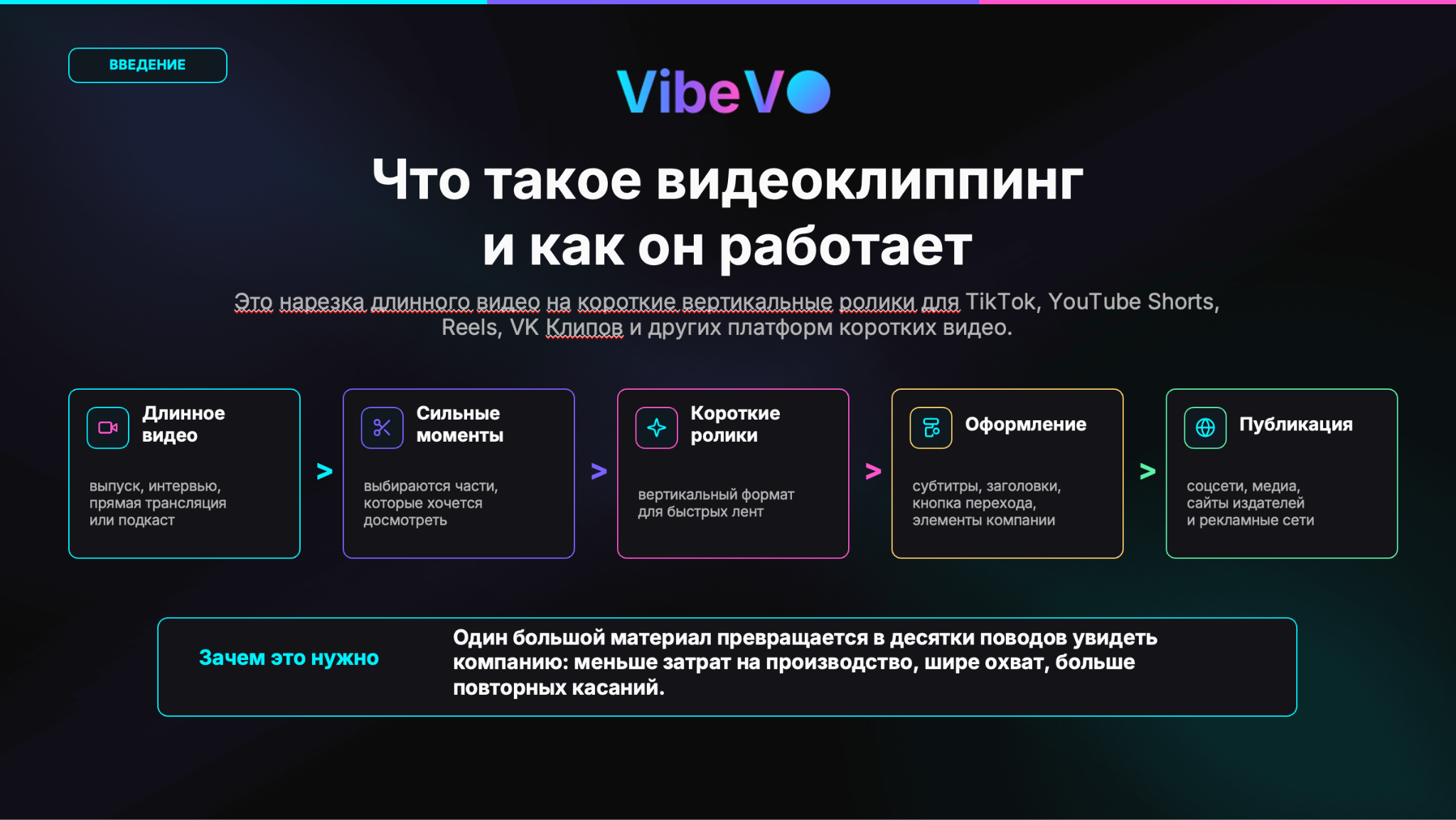
Video clipping is the transformation of long material into short vertical videos for recommendation feeds and author publications. The original video is broken down into strong moments, each fragment receives subtitles, a title, design elements, and a clear next step: go, save, watch to the end, take advantage of an offer, or learn more.
The economics of this approach are simple: one large piece of content provides dozens of reasons to re-engage with the audience. Instead of a one-off release, a company gets a series of repeated touchpoints, and platforms get content that is easier to distribute in fast feeds. Therefore, video clips are becoming not an auxiliary technique, but a separate way to buy attention.
External benchmarks in the presentation show why this shift has become widespread:
TikTok users spend an average of 95 minutes per day on the app.
Video advertising spending on the internet in the US exceeds 80 billion dollars.
Even if markets and platforms differ by country, the logic of consumption itself is already obvious: attention has shifted to short videos.
Chart 1. How video clipping works: the path from a long episode to a series of short videos. Source: VibeVO data, updated 08.06.2026. Click on the chart to open it in full size.
Overall picture: topics and platforms
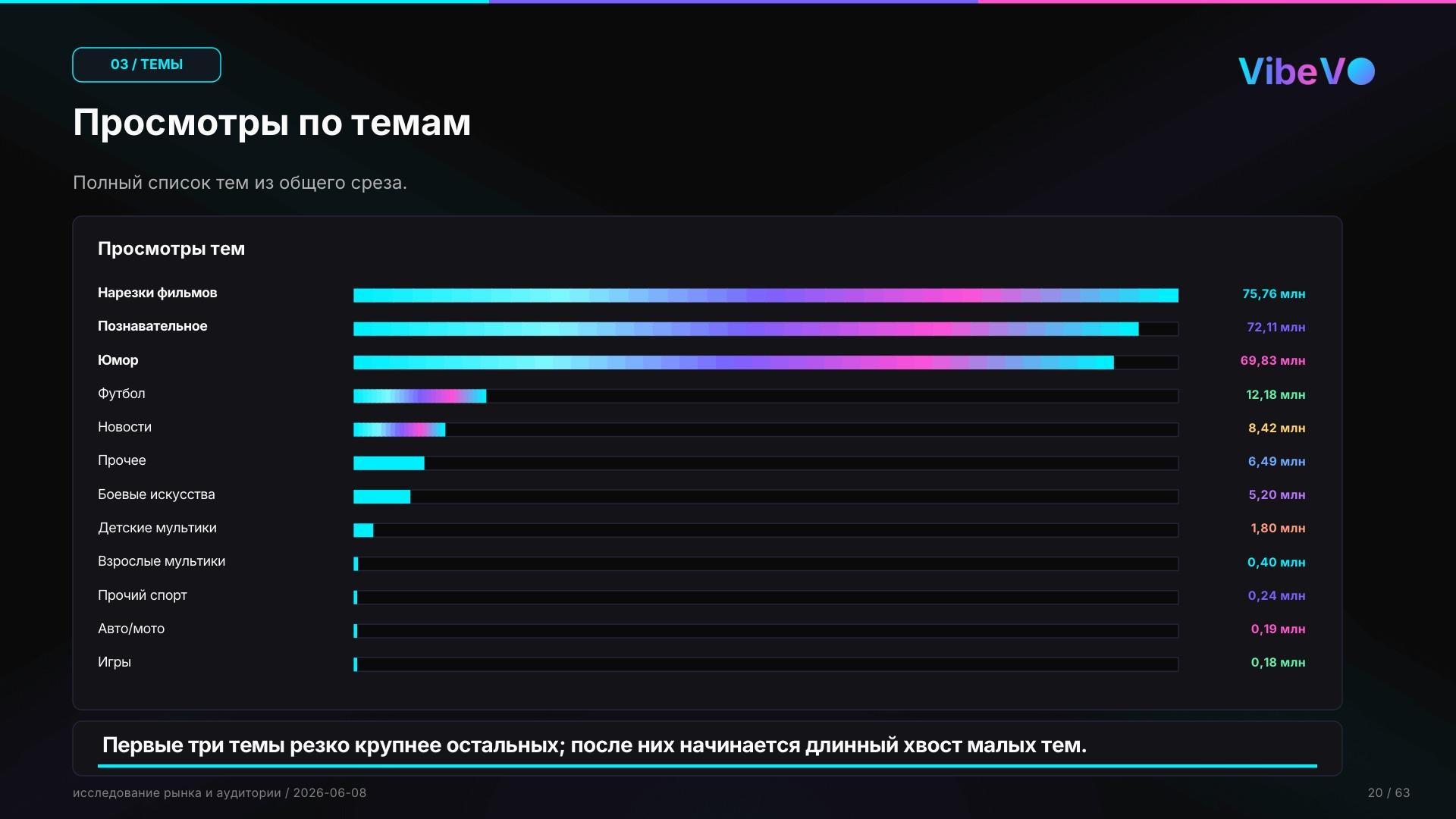
In the updated cut, the market looks concentrated. The three largest topics — movie clips, educational videos, and humor — account for 86.1% of the saved volume. Movie clips garnered 75.76 million views in 30 days, or 30.0%. Educational videos yielded 72.11 million views, which is 28.5%. Humor is almost at the same level: 69.83 million views, or 27.6%.
After the top three, a long tail begins: football — 12.18 million views, news — 8.42 million, other topics — 6.49 million, martial arts — 5.20 million. Children’s and adult cartoons, other sports, auto and moto, games are significantly less represented in the studied cut. This is an important caveat for placements: small topics cannot be generalized by the same rules as the largest ones.
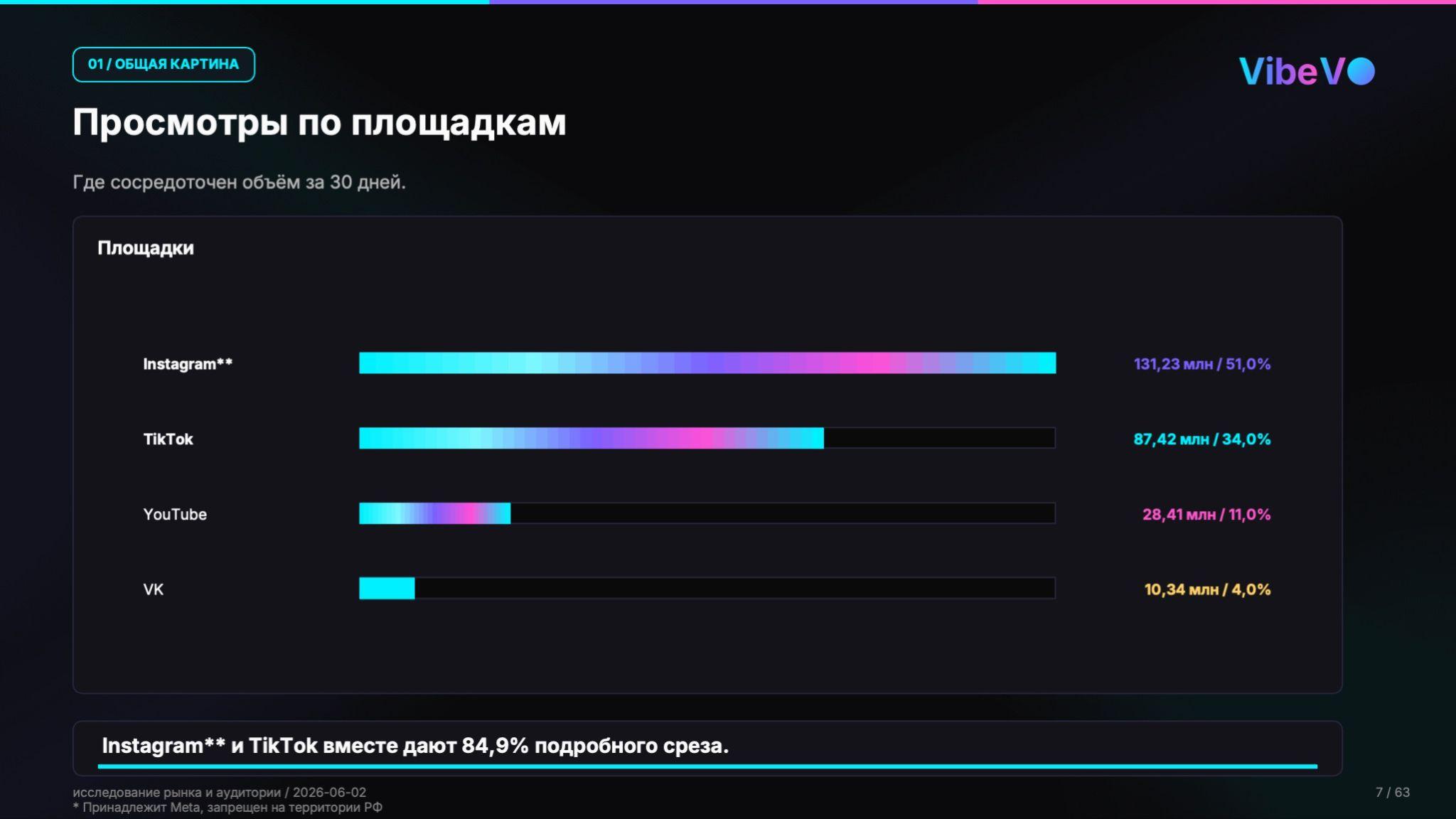
By platforms, Instagram* became the leader: 131.23 million views, or 51.0% of the detailed volume. TikTok yielded 87.42 million views, or 34.0%. Together, they form 84.9% of the detailed cut, but other platforms do not disappear: they can be important for individual topics, creators, and strong publications.
Chart 2. Views by topic over 30 days: the three largest topics are significantly larger than the rest. Source: VibeVO data, updated 08.06.2026. Click on the chart to open it in full size.Chart 3. Views by platform: Instagram* and TikTok form the bulk of views. Source: VibeVO data, updated 08.06.2026. Click on the chart to open it in full size.
Database size and strength of individual platforms
The database includes 4,224 videos with an active topic, 141 authors, 228 pages, and 16 advertising campaigns. This allows us to look not only at the overall volume but also at how platforms behave differently. Some provide scale, while others provide a stronger upper part of publications.
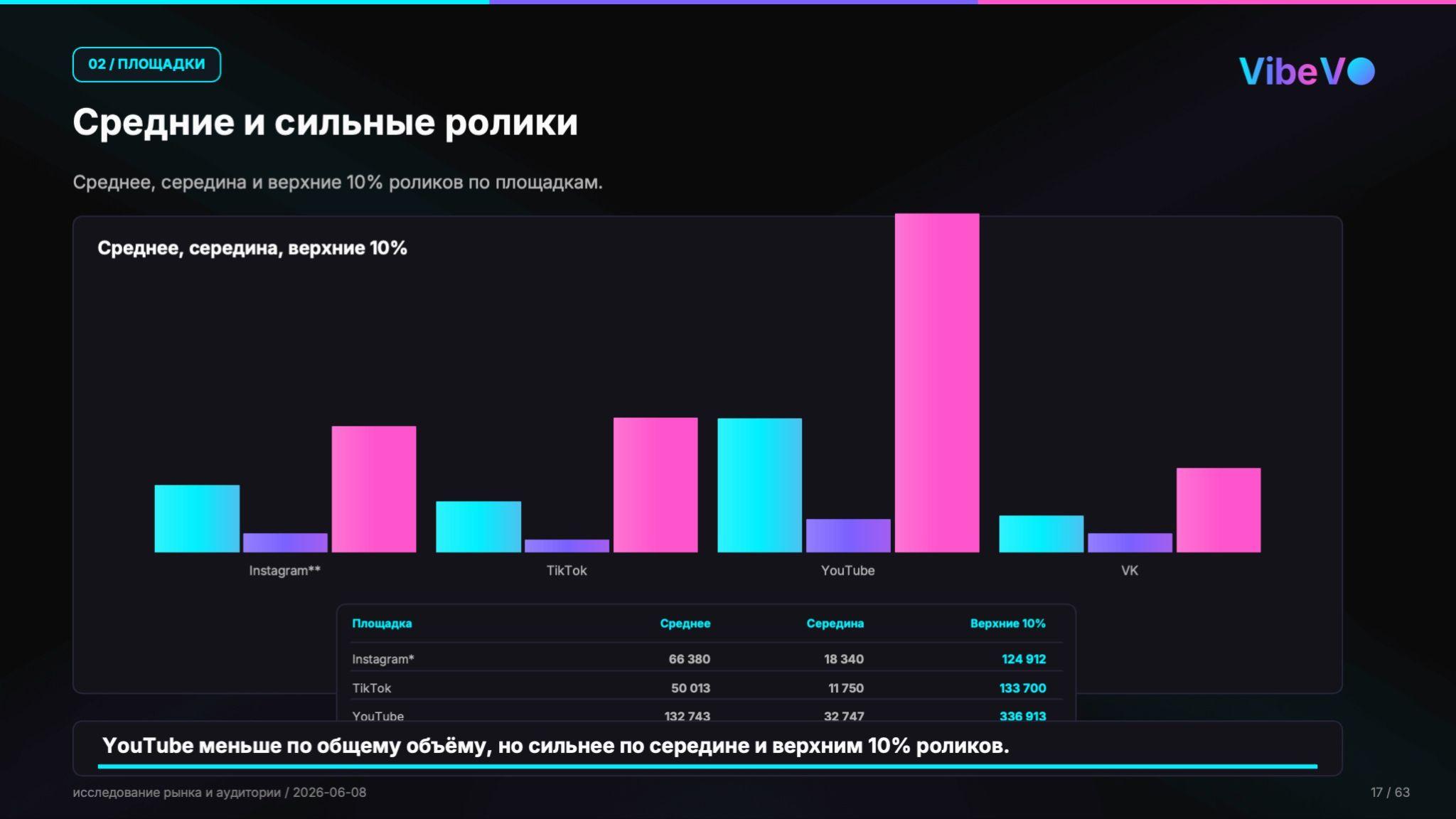
Instagram* leads in overall volume, but YouTube’s algorithms react more sharply to viral videos and give them a larger share of reach. On average, one video on YouTube received 132,743 views. For Instagram*, the average was 66,380, and for VK, it was 36,277.
Such a distribution changes the placement plan. Mass reach is logically sought in large Instagram* and TikTok bundles, but if there is viral content, YouTube can be a platform where it is easier to gain reach.
Chart 4. Distribution of reach among the top 10% most popular, median and average values by platform: YouTube is smaller in overall volume but stronger in the top 10%. Source: VibeVO data, updated 08.06.2026. Click on the chart to open it in full size.
It is better to analyze topics in bundles: topic plus platform
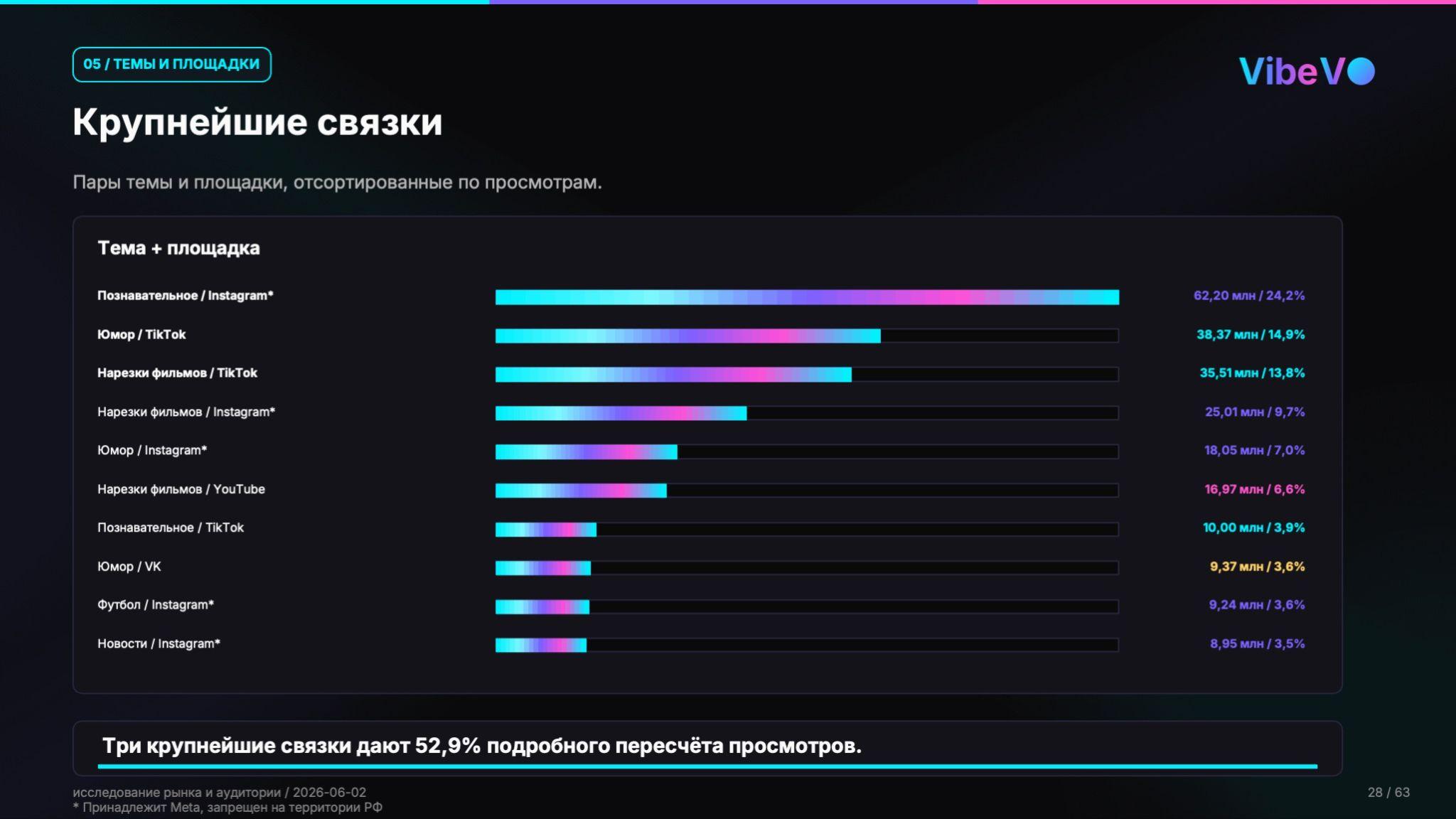
The total volume across the platform does not fully explain the market. The largest reach points occur where the topic and the distribution medium coincide. In the updated data, the largest combination is educational videos on Instagram*: 62.20 million views, or 24.2% of the detailed recalculation. This is followed by humor on TikTok – 38.37 million views, or 14.9%, and movie clips on TikTok – 35.51 million views, or 13.8%.
The three largest combinations account for 52.9% of the detailed recalculation of views.
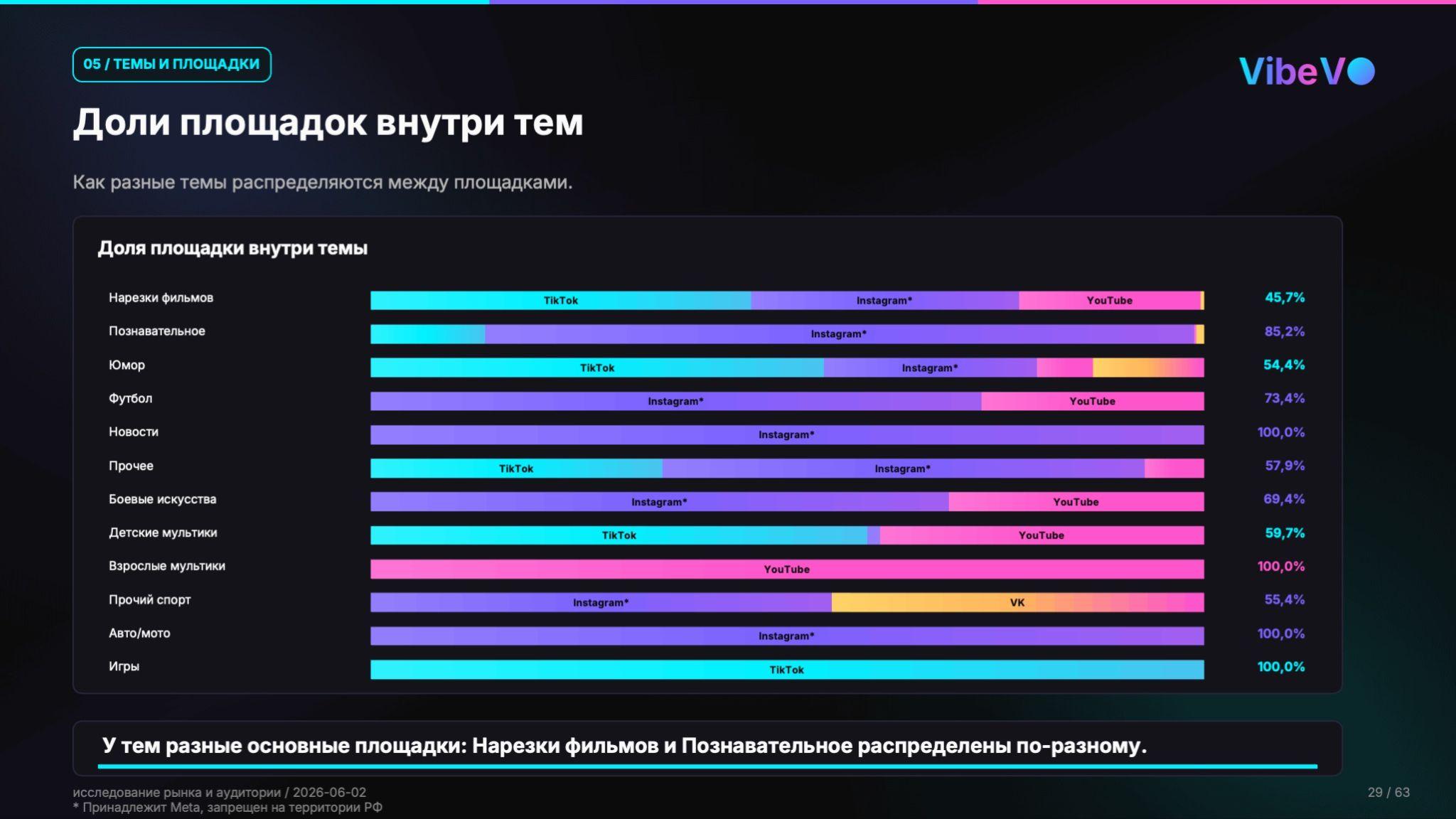
That is why video clipping cannot be launched using a single general grid for all tasks. For educational videos, auto/moto, Instagram* works better; humor, games, and movie clips rely heavily on TikTok; adult cartoons rely on YouTube. Different topics require different platforms, creators, and designs.
Chart 5. Largest topic and platform combinations: main volume arises from several combinations. Source: VibeVO data, updated 08.06.2026. Click on the chart to open it in full size.Chart 6. Platform shares within topics: different topics have different main platforms. Source: VibeVO data, updated 08.06.2026. Click on the chart to open it in full size.
Views are sharply distributed: the top portion of videos yields results
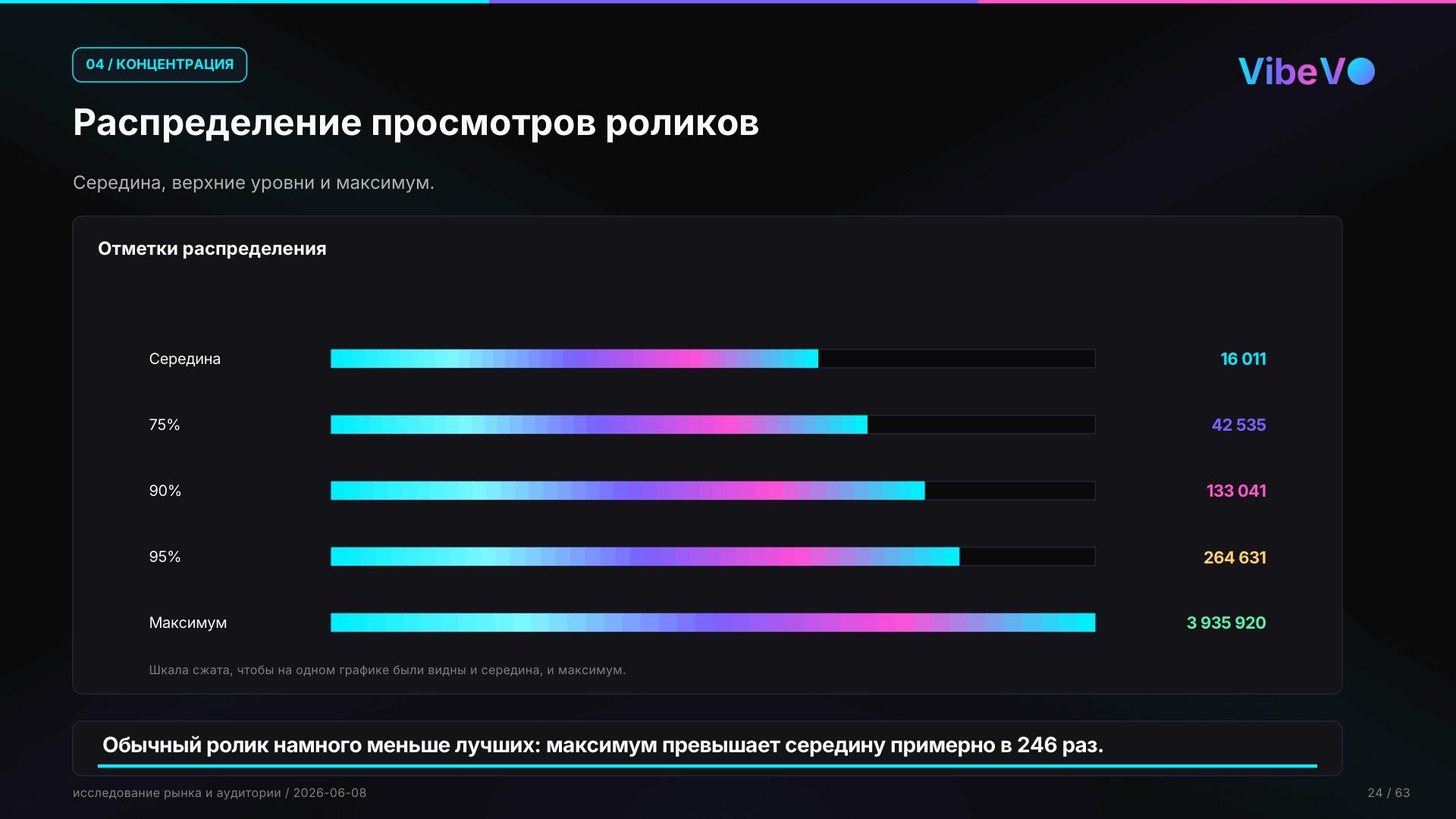
In short feeds, the average result hides a very strong unevenness. The average number of views is 16,011 views over 30 days. The 75th percentile is 42,535 views, the 90th percentile is 133,041. The maximum video garnered 3,935,920 views, which is approximately 246 times more than the median. As expected, the distribution is very uneven.
Even more illustrative is the share of the best publications. The top 10 videos generated 23.88 million views, or 9.3% of the volume. The top 50 videos – 62.48 million, or 24.3%. The top 10% of videos collected 165.54 million views, or 64.3% of all views. In other words, most views are generated by the top 5% of videos.
A practical conclusion for advertising in video clipping: you cannot rely on a single video. You need a set of video clips with different first seconds, titles, subtitles, overlays, and advertising message options. It’s not just the most beautiful video that wins, but a series of attempts where the best publications quickly gain more weight.